
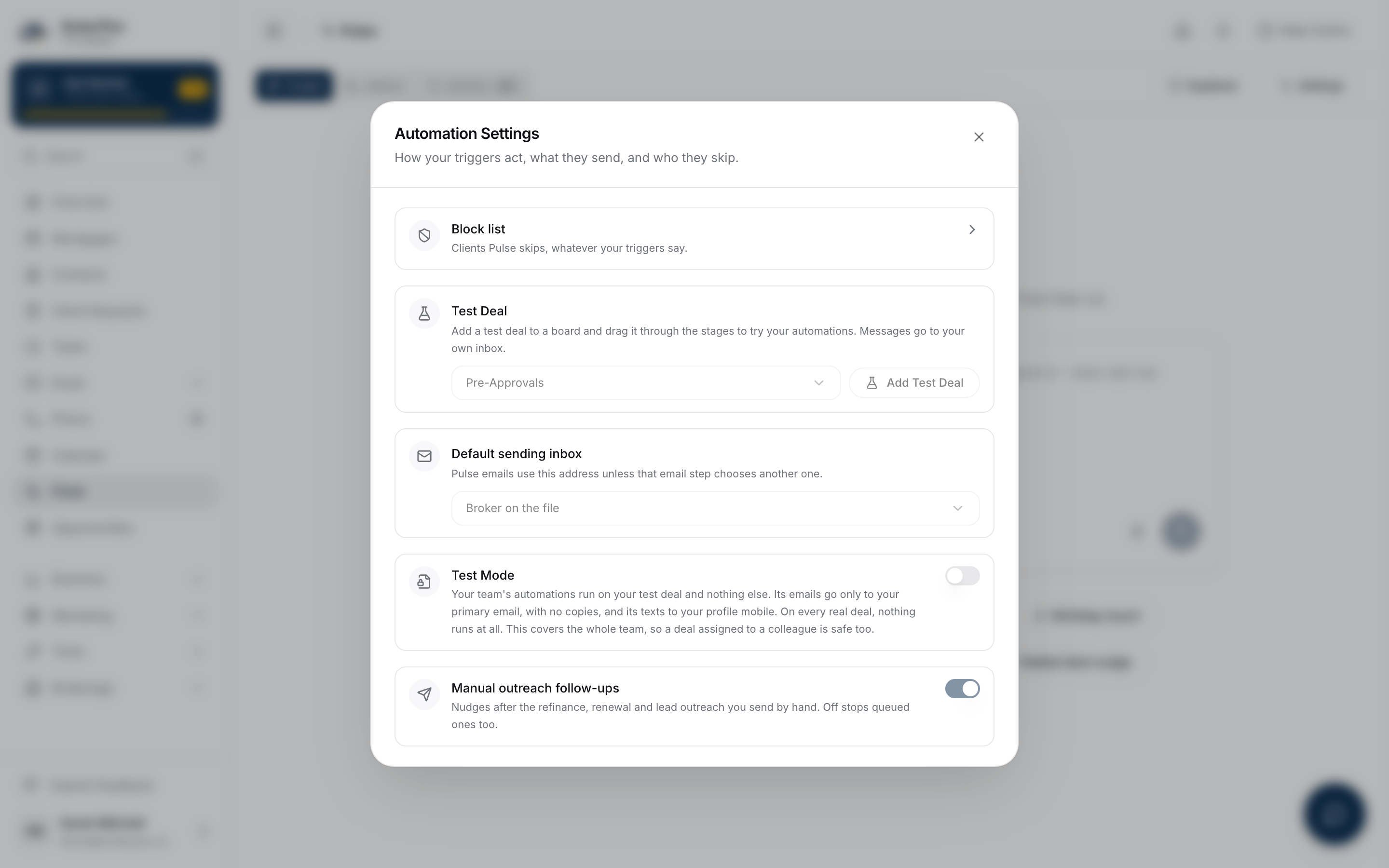
Test Mode is a hold on the whole Pulse library, not one automation. Turn it on and every automation on your team, on every board and canvas, stops before it can send an email, fire a text, file a task or move a stage on a real deal. Only your test deal keeps running, so you can watch a build fire without a client hearing from it.
Watch Mandric walk you through this topic
12:47When You'd Use This
Reach for this while shaping a new automation, cleaning up an old one, or onboarding a book you just imported. An automation is always created switched off, whichever editor drew it, so arming the automation and arming Test Mode are two separate presses, in either order. Turning Test Mode on first covers anything you build or edit afterward the moment you flip it live.
Where Your Switch Lives
Open Pulse, press the settings button, and find Test Mode under Advanced Pulse. The card explains itself in one line: automations run on your test deal and nothing else, emails go only to your primary address with no copies, and texts go to your profile mobile. It is off by default, and only the literal switch position decides whether it is on.
How You Can Tell It Is On
While Test Mode is on, a gold Test Mode chip sits beside Your Automations in the Library; hover it for what the hold covers. On a canvas, every automation's header is striped the same way, and an automation that is switched on reads Test Mode rather than On, because nothing it does reaches a real deal.
What Held Actually Means
A held automation is settled skipped before the executor touches it: no message under a different address, no task filed, no stage move. Every subject on every board is left alone, except the test deal, whose messages arrive in your own inbox and phone instead. A draft written before you turned the switch on stays parked; approving it by hand doesn't release it while Test Mode is on.
The Hold Your Team Can Also Set
Test Mode is one switch for your whole team. Automations run for whichever broker a deal is assigned to, so a switch per person would leave a colleague's files unprotected. Instead, when anyone turns Test Mode on, every deal on the team is held, and everyone on the team sees the same switch. Only teammates who can manage automations can turn it on or off.
What Classic Pulse Does Not Cover
Test Mode only guards automations that go through the trigger executor, and classic Pulse's birthday, anniversary and new year outreach does not. Those write a scheduled draft directly rather than through a step the executor checks, so Test Mode finds nothing to hold, and both autoSend and whether the automation is active default to on. If you rely on Test Mode to keep your Pulse library quiet while onboarding an imported book, this is where that assumption breaks: real clients can still receive a birthday, anniversary or new year message from classic Pulse while Test Mode is on. Check those three separately.
What To Watch Out For
Some test-deal behaviour is deliberately different from a real run. Paid identity screening is refused on it, and it can't be enrolled in monthly equity reports. Task-assignment steps still assign real tasks to real teammates even while Test Mode is on, so warn the team before running one that does. Test Mode reaches every automation in your library, canvas-built or added from a board stage alike.
What to Do Next
- Test an Automation Before It Goes Live to walk a test deal through your board with Test Mode on.
- Choose Draft or Automatic Sending to decide what a step does once Test Mode is off.
- Describe an Automation to Your Assistant if you're building the automation itself.