
A broker's page is one read on their whole book: what they've closed, what's still moving, who's on their client list, and how clean their compliance record is. Nothing on it is editable - it is where the brokerage looks, not where it acts.
Opening a Broker's Page
Select a broker's name from the roster on Brokerage > Teams, or from the leaderboard on the revenue and overview pages, to open their page. It renders one broker at a time and answers 403 if you hold no access to it.
The Header and the Licence Chip
The header carries their name, their brokerage access level, an Inactive badge if their account is switched off, and their email (or Email released if that address has since been freed). Below it: when they joined, when they were last active, their licence expiry date if one is set, and the same expiry chip the roster shows - amber inside 90 days, red inside 60, Expired once it has passed.
Production and Pipeline
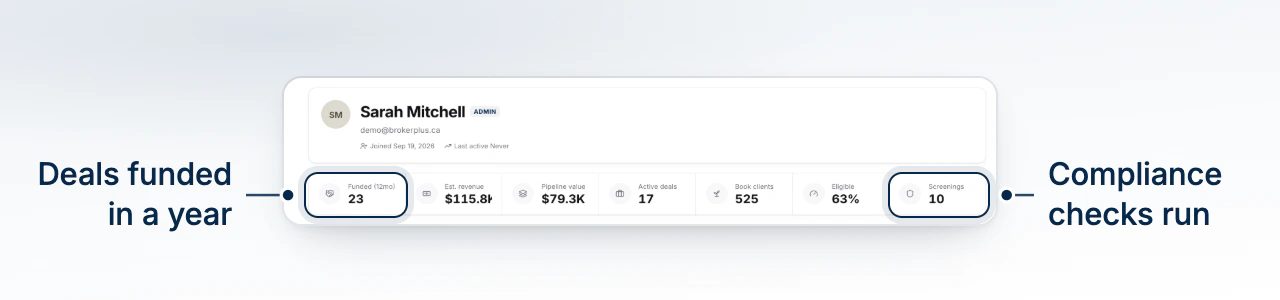
A KPI rail opens with funded deals over the last 12 months, estimated revenue, pipeline value, active deals, book clients, the percentage of their book currently eligible, and screenings run. Below it, two charts: Production is estimated revenue by month from their funded deals, with revenue, funded volume and opportunity revenue totalled underneath; Deal Pipeline is their active origination deals by stage, with their win rate (funded against everything that's resolved, won or lost).
Book of Business and Compliance
Book of Business is their refinance and renewal opportunities: the single best one surfaced first, a bar showing how their book splits across eligible, in review and not eligible, and a searchable, sortable client roster underneath. Compliance is a screening-coverage ring (screened clients against everyone assigned to them), counts for screenings run, open enhanced due diligence cases and rescreenings due in the next 90 days, a risk-rating breakdown, and a list of their active EDD cases with days left or days overdue on each.
Recent Activity and Outreach
A donut breaks their book down by opportunity type - refinance, renewal, pre-renewal, or both. Beside it, an activity feed: counts for funded deals, sends, client contacts and meetings, then a searchable timeline mixing logged engagements and outreach sends, newest first, with anything logged automatically marked Auto.
What to Do Next
- Read Brokerage Revenue to see this broker ranked against everyone else on the leaderboard.
- Manage Brokers in Your Brokerage to change their access level or licence expiry.
- Review Compliance Across the Brokerage for the firm-wide view their compliance numbers roll up into.