
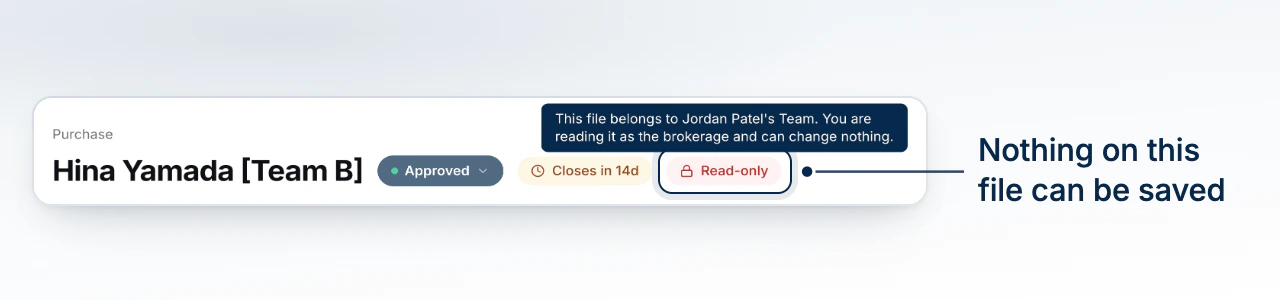
A brokerage admin can open any deal in the brokerage and read all of it. A deal that belongs to a team you do not run opens read-only, with a chip at the top naming whose file it is.
How You Get There
Every route in is a read. Select a card on the brokerage Mortgages board, follow a deal from a broker's scorecard, or switch into the team from the team switcher and open the deal from its board. BrokerPlus switches you into the deal's team as you open it, because a deal's record is read through the team it belongs to.
The Chip That Names Whose File It Is
At the top of the deal, where a locked stage would show its lock, the same chip reads: this file belongs to that team, and you are reading it as the brokerage and can change nothing. There is no toggle on it. It is a statement about the file, not a mode you can leave.
What You Can Read
The whole record: the overview and ratios, the application and every applicant, documents, conditions, notes, the activity timeline, submissions and the lender's response, and commission. Reading it is the same as the team's own read, and nothing is hidden from the brokerage.
What Is Refused, and Why
Every save is refused, on every tab, and BrokerPlus does not offer one. The editors know the file is read-only and do not show a control that would fail when pressed. The rule underneath is that the brokerage reads across every team and writes to none of them: who may change a file is decided by the seat a person holds on the team that owns it, and the principal broker holds no seat on a team they do not run.
That is the same proposition as a stage the broker locked, reached from the other side, which is why it wears the same chip.
Your own team is unaffected
On your own book you are the broker, and every editor works as it always has. The read-only view is only for a file on another broker's team.
Getting Back to Your Own Board
Opening a file from the brokerage board leaves you switched into that team. Use the team switcher to return to your own, or open Brokerage > Mortgages again, which reads across every team no matter which one you are standing in.
What to Do Next
- Read Every Deal on the Mortgages Board is the way in.
- Tour the Deal Record walks the tabs you can read.
- How Teams Work in Your Brokerage explains why a file has one owning team.