
Brokerage > Permissions is a short page of rows. Each row is a setting every team starts with, plus two controls saying who decides it and which way it goes. Brokerage admins are never limited by a row, except where the row says so.
What a Row Decides
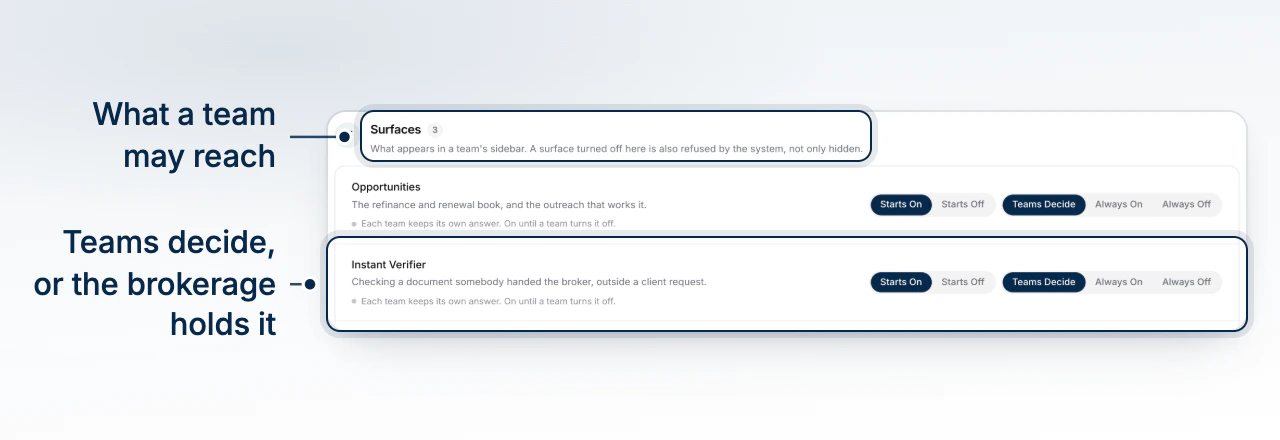
Every row answers two questions, one control each. Who decides: the teams, or the brokerage. Which way: on or off. A team inherits the brokerage's answer by not having one of its own, so changing a row reaches every team that hasn't decided for itself, the moment you change it.
The last change on a row is named beside its label, with who made it and when.
Who Decides
| Position | What it means |
|---|---|
| Teams Decide | Each team keeps its own answer. The row's on or off is the default they start from. |
| Brokerage | The brokerage's answer is the only answer. A team's own is set aside while the brokerage holds the row, and returns when the brokerage hands it back. |
Handing a row to the brokerage holds what's already in force rather than picking a side, so one press never turns something off for every team without anyone choosing that. A row the brokerage holds wears a Held chip.
Surfaces
Three rows decide what appears in a team's sidebar: Opportunities (the refinance and renewal book and its outreach), Instant Verifier (checking a document a broker was handed, outside a client request) and Canvas (the preview of every client-facing surface). A surface turned off is refused by the system, not just hidden, so turning one off asks for confirmation first.
Deals
Required Deal Fields is a picker of fields a deal must have filled before validating as ready to package. The standard set is always required; these are on top. It binds you as well as the teams.
Contacts
Duplicate Check Across Teams decides how the brokerage's book of people is kept across teams. Turned on, a person already on another team's book can't be added again, and the broker is told so without seeing that team's record. Turned off, only a team's own contacts count as duplicates. It starts off, and binds the brokerage's own contacts too.
Compliance
Four rows decide what a team may add to its own compliance hub, beyond what the brokerage sets: Team Requirements (compliance requirements a team writes for itself), Team Documents (a team's own forms to sign, or its own paper standing in for a built-in disclosure), Team Package Templates (its own compliance package layouts) and Team Lender Profiles (its own reviewed lender wording for disclosure documents). All four start on, since a team has always been able to add its own; turned off, a team works from the brokerage's set alone, and writing its own is refused.
None of these four bind you: the firm's own requirements, documents and package templates are yours to write whichever way a row is set, and they reach every team either way.
What a Team Sees
A held setting shows on the team's settings page as Set by your brokerage, and a change is refused with a message naming the principal broker to ask. A surface turned off disappears from the sidebar and refuses the public API too.
What to Do Next
- How Teams Work in Your Brokerage explains what a team's broker holds on their own.
- Understand Roles and Permissions covers the seat a person holds on a team.
- Set Your Brand Colours and Logo is a brokerage default a team may override.