
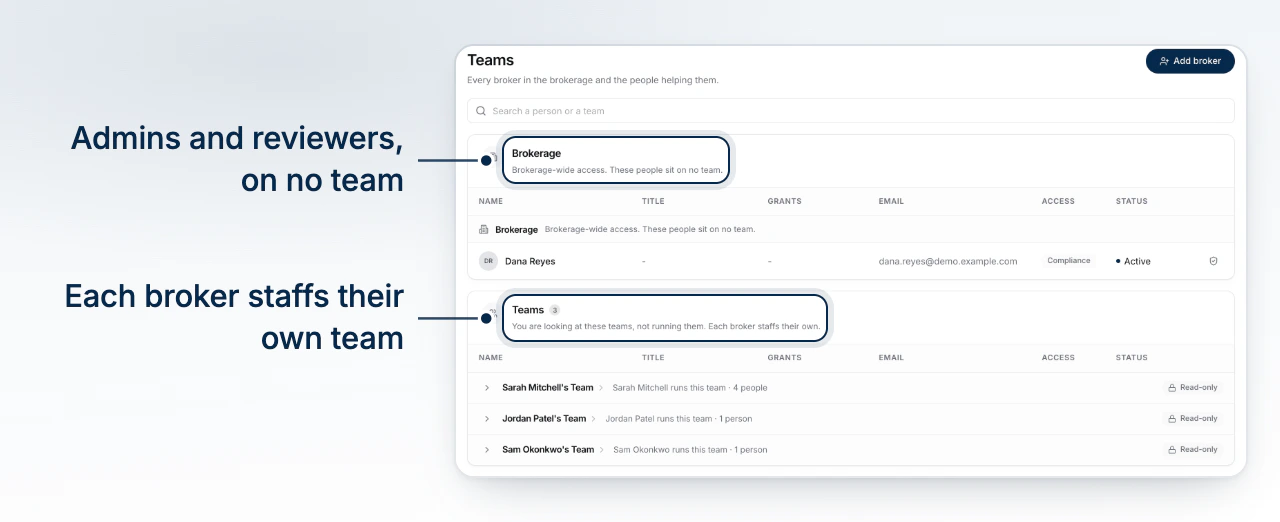
A brokerage is a set of teams, and each team is one broker's book with the people helping them work it. Brokerage > Teams shows every team; you are looking at them, not running them, because each broker staffs their own.
What a Team Is
A team has exactly one broker, who owns it, and any number of support seats. The broker's book, their inbox, their brand and their automation settings hang off the team, and the people on it reach what the broker delegated to them. Two teams do not share a client: a contact or a deal belongs to one team.
How a Team Gets Created
A team is created for a broker, not by the brokerage. Select Add broker on the Teams page and enter their email: they join the brokerage and run their own book, and the team is made for them the moment they accept. There is no separate "create a team" step, and no team without a broker at its head.
A brokerage invite cannot name a team or the permissions on it. That is deliberate: a brokerage admin holds no seat on the team they would be staffing, and the invitation that puts someone on a team comes from that team's broker, on their own Team page.
Who Staffs a Team
The team's broker, and anyone they hand Manage the team to. They invite the support seats, choose each person's permissions, and can remove anyone but themselves. Changing who owns a team means transferring it, not editing the broker's row.
The brokerage can turn this on for the principal broker with Principal Manages Team Membership on the Permissions page. Until then a team's invites are, as the Teams page puts it, their broker's to revoke.
Reading a Team From the Brokerage
Select a team to open it. The page names who runs it and when it was created, counts the people on it and the open deals and loan volume of its book, and lists every seat the team has held with what the broker delegated to each. A seat that has ended stays in the list as history. Everything on the page is read-only here, for the same reason the roster is.
People Who Sit on No Team
Brokerage admins, compliance reviewers and view-only users hold no team membership by design, and the roster files them under Brokerage. They read across every team; they work on none. A member invited without a team onboards as a broker and gets a team of their own.
An archived team keeps its history
Archiving a team keeps everything it held and stops anyone being added to it. The page says so at the top.
Giving a Team Its Own Brand
Each team may paint its client-facing work in its own colours, fonts and logo, and a key it has not set follows the brokerage's. The brokerage can turn that off for every team at once on the Permissions page.
What to Do Next
- Set Brokerage Permissions to decide what every team gets.
- Invite Your Team is what a broker does on their own team.
- Understand Roles and Permissions for the seat a person holds.