
BrokerPlus runs nine scanners against your book on a schedule. Each one watches for a specific moment, either on a live file or across your whole portfolio, and files a task the moment it finds one. Five of the nine are on from the day your workspace opens; four wait for you to turn them on.
Watch Mandric walk you through this topic
6:49When You'd Use This
Open this when a task shows up in your queue that you never created and you want to know why, or when you're deciding whether a scanner belongs on for your book at all. It's also the place to look if your queue feels too quiet (a scanner you'd want may still be off by default) or too noisy (one you don't need is running with a default that doesn't fit how you work).
The Nine Scanners
| Scanner | Default | Fires when |
|---|---|---|
| Closing Date Approaching | On | A deal's closing date falls inside the lead time (14 days) |
| Condition Due | On | A lender condition's due date falls inside the lead time (7 days) |
| Rate Hold Expiring | On | A held rate falls inside the lead time of expiring (7 days) |
| Funding to Confirm | On | A closing date has passed and stays open through the window (30 days) |
| Stalled Lead | On | A lead has gone quiet for the inactivity period (5 days) |
| Unanswered Email | Off | Your last email on a file goes unanswered through the waiting period (7 days) |
| Client Touchpoint | Off | A past client hasn't heard from you in the interval (335 days) |
| Renewal Opportunity | Off | A mortgage falls inside the lead time of its maturity date (120 days) |
| Refinance Opportunity | Off | A client's equity has opened up, and the cooldown since you last flagged it has passed (90 days) |
The four that start off file across your entire portfolio, not just a handful of live files. On an imported book that can mean hundreds of tasks at once, which would bury the deadline work the queue exists for. Turn one on when you're ready to work that category deliberately.
Tuning the Timing and Who Can Change It
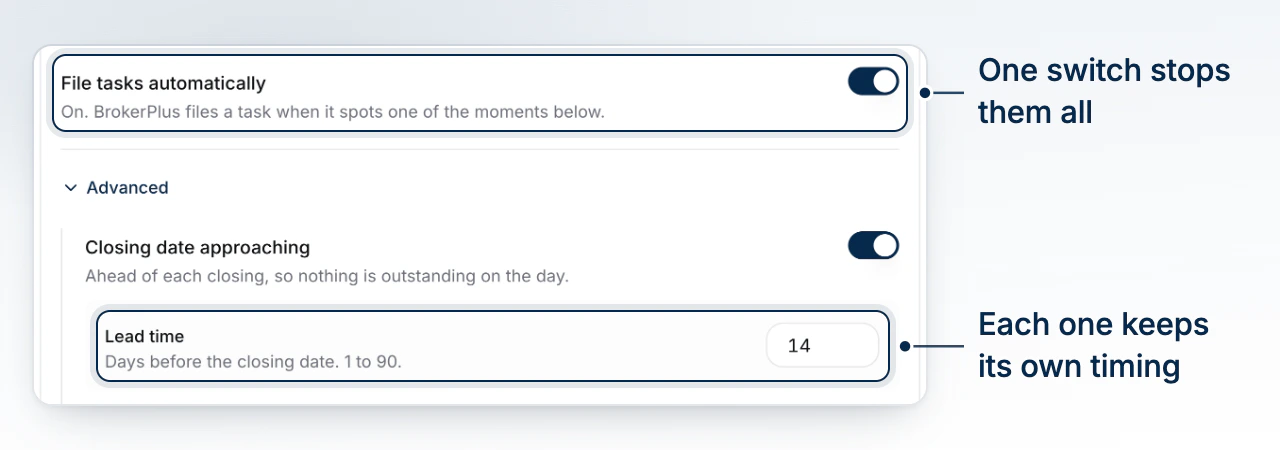
Open Tasks, select the settings icon, then Automatic Tasks. A single switch at the top, File Tasks Automatically, stops all nine at once and closes anything already filed. Expand Advanced to reach each scanner's own toggle and its one tunable number, a lead time, a window, or a cooldown depending on the scanner, each with its own bounds (Closing Date Approaching runs 1 to 90 days, Renewal Opportunity runs 30 to 365).
Only your team's broker or an org admin can change any of this. Everyone else sees the same panel locked, labeled Set by your team's broker.
Common Gotchas
- Turning a scanner off closes what it already filed, not just new ones from that point on.
- Reopening an auto-closed task detaches it for good. A resolved task shows a Resolved by BrokerPlus banner with a Reopen button that asks for a reason. Reopening pins it open permanently, so it will never auto-close again even if the deadline resolves. Use it when BrokerPlus closed something you still need to act on.
- A scanner won't refile the same deadline twice. Each one tracks the deal (or condition) and the date together, so a rescan the next day doesn't duplicate an open task.
What to Do Next
- Triage the Tasks Page to see where these land once filed.
- Create and Assign a Task for the tasks you file yourself.
- Task Reminders and Your Daily Brief to get nudged about what's due.
- Review What Runs on Its Own for the fuller picture of BrokerPlus's other automations.