
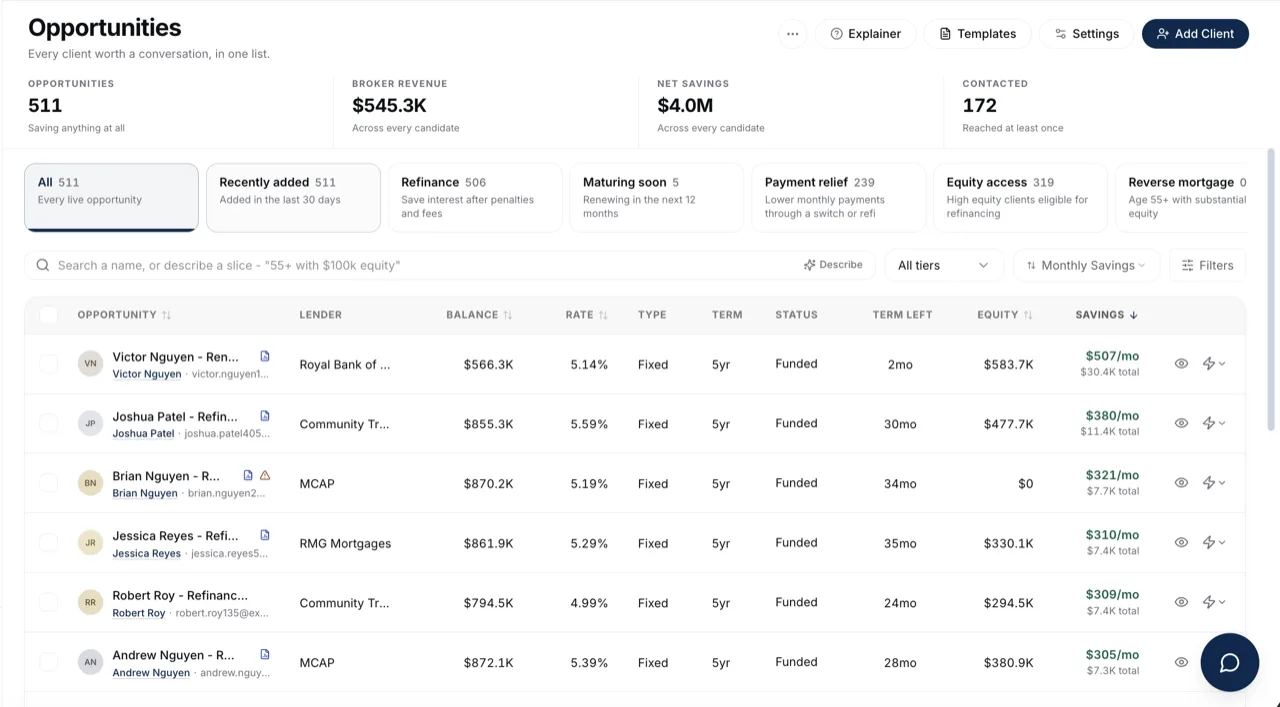
The row of cards above your Opportunities list isn't a filter, it's eleven saved questions about your book. Clicking one replaces the list with its own slice and its own sort order, so "who could save money" and "who is going cold" each show up in the order that actually matters for that question.
Watch Mandric walk you through this topic
7:49When You'd Use This
Reach for a block whenever you want a specific kind of conversation rather than your whole book at once. Prepping renewal calls for the month, checking who a refinance conversation makes sense for, or finding clients you haven't followed up with, are three different lists, and each has its own card.
The Eleven Blocks And What Each One Asks
Seven blocks run on fixed logic with nothing to configure. Four read a threshold from Opportunity Settings, so tightening or loosening that number changes exactly what lands in the card.
| Block | What it asks | Tunable |
|---|---|---|
| All | Every live opportunity, highest savings first | No |
| Recently added | Added to your book in the last 30 days | No |
| Refinance | Clears your minimum monthly savings floor after penalties and fees | No (uses the savings slider) |
| Maturing soon | Renewing in the next 12 months, soonest first | No |
| Payment relief | A lower monthly payment is available through a switch or refinance | No |
| Equity access | High enough home equity to be worth a refinance conversation | Yes, equity floor |
| Additional property | Owns another property beside the one on their file, including properties recorded on cancelled and declined files | No |
| Reverse mortgage | Old enough and equity-rich enough to be a reverse mortgage candidate | Yes, age and equity floors |
| Move-up buyers | Buying power exceeds their current home's value by your set ratio | Yes, move-up ratio |
| Untouched | Never contacted about this opportunity | No |
| Going cold | Contacted, but no reply within your window | Yes, going-cold days |
The four tunable blocks are your closest read on how thresholds shape the list: move a number there and the cards here immediately count differently.
Why Picking A Block Changes The Sort
Each block carries its own default sort along with its filter, because the useful order isn't the same question twice. Equity access and reverse mortgage sort by equity, highest first. Move-up buyers sorts by borrowing power. Maturing soon sorts by nearest maturity date, since a renewal six weeks out matters more than one a year away regardless of its savings. Switching blocks resets you to that block's own order; you can still re-sort manually from there.
Linking Straight To A Block
Each block's URL carries its key, so /opportunities?block=equity_access opens straight into that slice. That's useful for a bookmark, a saved link in your own notes, or sharing a specific cut of the book with a teammate without walking them through clicking the card.
Common Gotchas
- The count on a card can go blank instead of showing zero. A blank count means it couldn't be computed yet, not that the block is empty; the list itself still works even when counts fail to load.
- A client can sit in more than one block at once. Going cold and Equity access aren't exclusive; a candidate can clear both.
- Additional property counts cancelled and declined files even when Cancelled & declined files is off. The client still owns that other property whether or not the application funded, so it stays a renewal and equity conversation.
- When the mortgage on a client's other property is tracked in your book, Additional property lists that property as its own row, with its own address, lender and renewal date and the status Additional Properties. The file the property was recorded on drops out of the block once every other property on it has a row of its own. A property with no renewal date or balance on record is still reached through the file it sits on.
- If a block you expect to be full looks thin, check the threshold behind it before assuming your book changed.
What to Do Next
- Understand Opportunities if you're still getting oriented on where these candidates come from.
- Adjust Your Opportunity Thresholds to change what the four tunable blocks count as a match.
- Filter And Sort Your Opportunities to narrow further within a block.
- Work Your Maturing Renewals for more on the Maturing Soon card specifically.