
Opportunities is your own book read back to you. Every mortgage you have funded or imported is priced against current rates each day, and the ones worth a call are listed with the savings, the equity and the maturity already worked out.
Watch Mandric walk you through this topic
7:49What an Opportunity Is
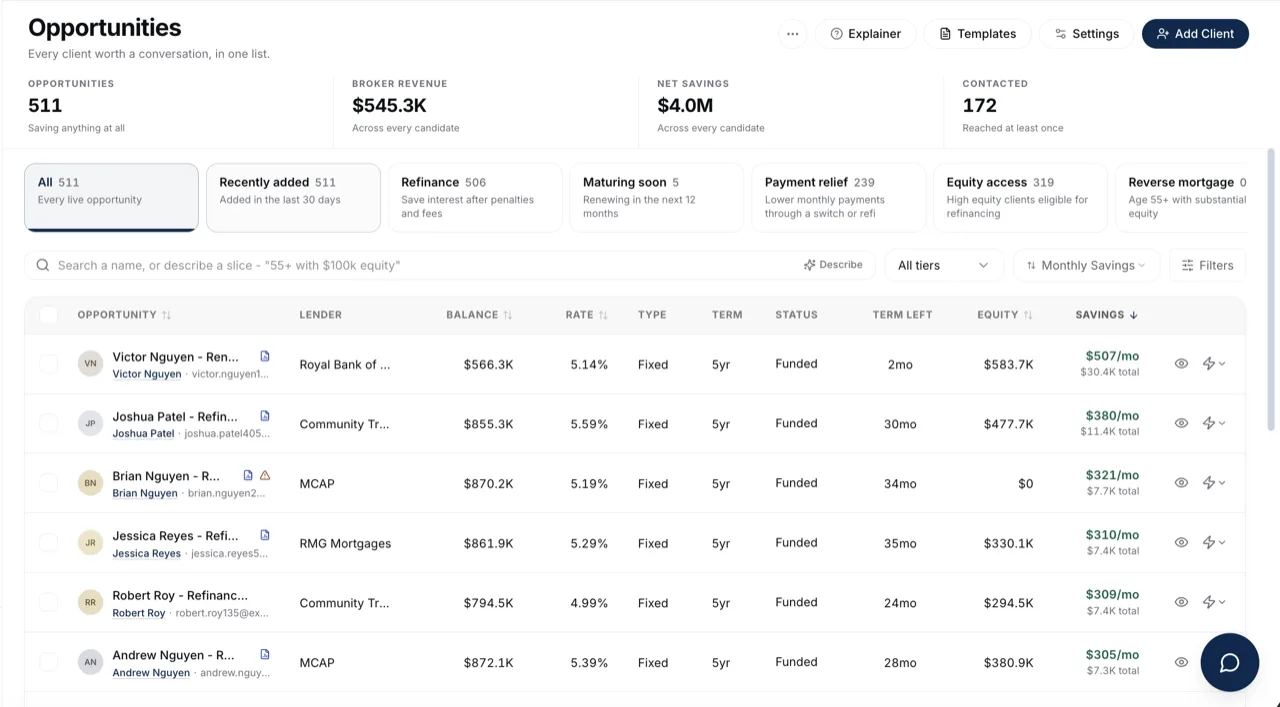
One mortgage in your book, with today's numbers attached. Each row carries a tier from its monthly saving: Strong savings clears the floor you set, Needs review saves something but less than the floor, and No savings means the penalty eats the gain. The tier picker in the toolbar filters by it. The client's name under the row title is a link to their contact record, and View Contact in the row's action menu opens the same page, so you can reach the person without opening the opportunity.
Where Candidates Come From
Deals you import, and funded deals on your boards. A funded deal that has a balance, a rate and a maturity date still in the future is picked up automatically on the next pass, so a file does not have to be imported twice. Matured and archived deals are left alone. Dragging a card into a board stage you flagged to exclude from the book takes it off this page, and dragging it back puts it straight back.
Cancelled and Declined Files
An imported file marked cancelled, declined, withdrawn or expired can still appear in Opportunities when it has a mortgage maturity date. The usual archive, board and opportunity filters still apply.
To include ended files without a maturity date, open Filters, expand Flags, and turn on Cancelled & Declined Files. This does not include a person who is only a lead with no deal. Clear All turns this option off and restores the default filters.
Each filter opens from its own labelled field. The text on the field shows your current selection, so you can check it without expanding every list.
Refinance Against Renewal
Remaining term decides which one a client is. Six months or less is a renewal, seven to twelve months is a pre-renewal, and both sit under the Maturing soon block. Anything further out is a refinance candidate, and it only qualifies for the Refinance block when its monthly saving clears your floor. The savings column follows suit: a renewal has no penalty to earn back, so it reads Total difference rather than net savings.
What the Figures Along the Top Mean
Opportunities counts the rows your current filters left, and the line under it names the floor they cleared. Broker revenue and Net savings are book-wide dollar totals across every candidate, not just the page you are looking at. Contacted is how many clients you have reached at least once. With Master view on, an owner sees the whole brokerage's book here instead of their own.
Why the List Refreshes on Its Own
Posted and market rates refresh every morning, and each refresh reprices every candidate in your book. Savings, tier and type move on their own overnight. Once you have contacted someone, their type is held to whatever you contacted them about, so a refinance conversation is never re-labelled a renewal mid-flight.
What an Empty Page Means
No client data yet means nothing has been imported. A page that is empty with clients in your book is almost always your thresholds: Opportunity Settings holds the minimum monthly saving, the equity and age floors behind each block, and how long counts as going cold. Loosen one and more of your book appears.
What to Do Next
- Review an Opportunity Candidate before you reach out.
- Import Your Book From a Spreadsheet to bring the rest of your deals in.