
Any import leaves you with the same person on two records. BrokerPlus collects those collisions on Duplicate contacts and suggests them; nothing is ever merged for you. You choose which record survives, settle any values that disagree, and confirm.
Watch Mandric walk you through this topic
8:07How Duplicates Are Detected
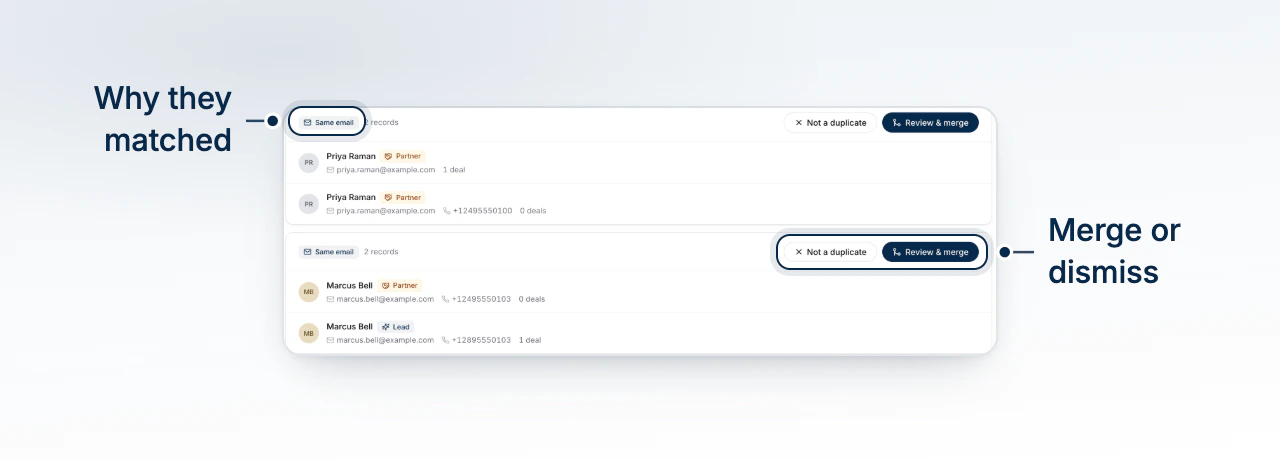
A chip on the CRM toolbar counts the sets found and opens the page. A set is either Same email or Same name, and both are exact matches: the same address, or the same first and last name together. Contact details are stored encrypted, so a near miss cannot be found and a typo in an address is not a match. Only your live book is scanned, so archived, deleted and already-merged records are left out.
Reviewing a Suggested Set
Each card lists every record in the set with its email, phone and deal count. Selecting a record opens that contact. Search by name, email or phone number to find one set in a long list. Review & merge opens the three-step review.
Choosing Which Record to Keep
The first step asks Which record should we keep? and preselects the most complete record: the most identity fields filled, then the most deals, then the oldest. Pick a different one by selecting its row. Everything the other records are linked to, including deals, tasks, notes, activity and screenings, moves to the record you keep, and the others are archived. Where two records sit on the same deal, the stronger role is the one kept. A duplicate credit report on that deal stays with the archived record rather than moving.
Resolving a Different Email or Phone
When the records disagree on an email address or a phone number, a Resolve differences step appears and asks which value the kept record carries as its primary. The value it already holds is tagged Current. Nothing is discarded: every address and number that did not win is preserved as an additional email or phone under the contact's details.
Marking a Set as Not Duplicates
Two people can genuinely share a household address or a name, and the scan runs fresh every time you open the page. Not a duplicate records that answer so the set stops coming back. A set of three records an answer for each pair in it, and the set stays visible while any pair is still unanswered.
Why a Merge Cannot Be Undone
The final step restates who you are keeping, how many records merge into them, and that This can't be undone. Read it rather than clicking through it.
Old links follow the merge
A merged record is archived pointing at the one you kept, so an existing link to it now opens the surviving contact instead of a dead page.
What to Do Next
- Tour the Contact Profile to check the additional emails and phones a merge preserved.
- What the CRM Page Shows to find the duplicate chip on the toolbar.