
Open Tools > Calculators > Affordability to answer the question a client asks before they ever look at a listing: given this income, how much house can they carry.
What to Enter
Enter gross annual income, monthly debt payments on cards, loans and lines of credit (never the new mortgage itself), the contract rate, a down payment, and the amortization. Leave monthly property tax and heating blank and the calculator estimates them: tax at 1% of the purchase price a year, heating at $100 a month. Condo fees default to none, and only half of whatever is entered counts toward the ratios.
The Stress Rate
The calculator never qualifies at the rate a client is quoted. It qualifies at the OSFI minimum qualifying rate: the higher of the contract rate plus 2%, or 5.25%. A client quoted 4.99% is tested against 6.99%, and that stress rate is what sizes the mortgage. The estimated monthly payment shown below the result is calculated separately, at the real contract rate, so the client also sees what they would actually pay.
Reading GDS and TDS Against Their Caps
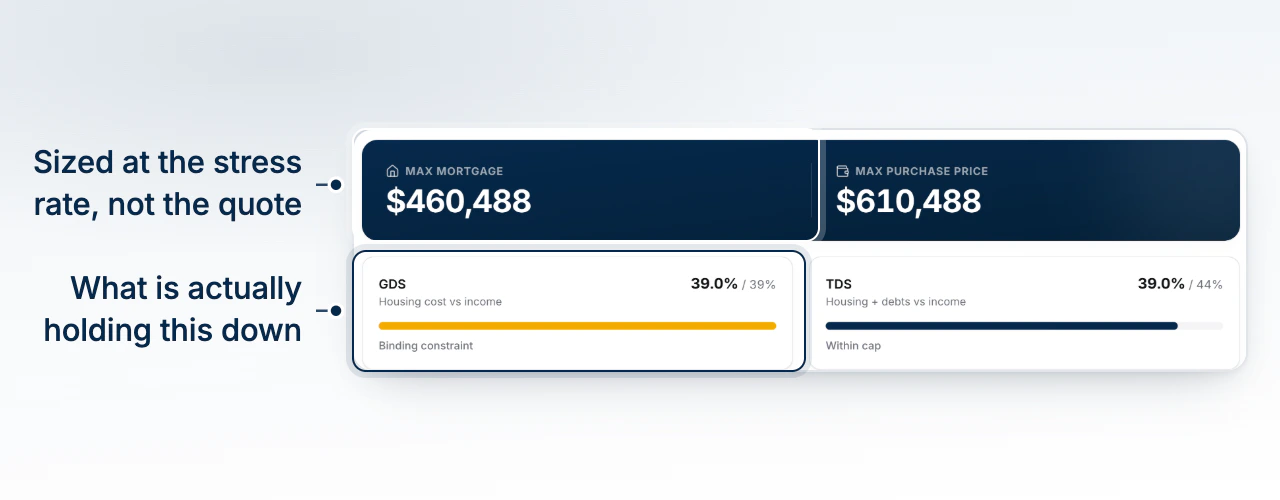
Every mortgage is qualified against two debt-service ratios. GDS (gross debt service) is housing cost against income, capped at 39%. TDS (total debt service) adds every other debt payment on top, capped at 44%. The result screen shows both as bars against their cap, each labelled with the percentage used and which one, if either, is binding.
The Binding Constraint
A client with light other debts is usually held back by GDS: the housing cost alone eats their income budget before other debts even enter the picture. A client carrying a car loan or a card balance is often held back by TDS instead, since those payments share the same 44% ceiling as the mortgage. The calculator names the binding constraint directly, which is the fastest way to tell a client what would actually move their number: paying down a loan helps a TDS-bound client and does nothing for a GDS-bound one.
Turning the Answer Into a Purchase Price
The result leads with two figures: the max mortgage the income supports at the stress rate, and the max purchase price, which is that mortgage plus the down payment entered. The housing budget line beneath it is the monthly amount, at the qualifying rate, that keeps both ratios under cap; the payment at the contract rate shows what the client's real monthly bill would be on that same mortgage. Change the down payment and both figures move together, since the mortgage is solved independently, then added to whatever cash the client is putting down.
What to Do Next
Use Estimate Closing Costs and Cash to Close to turn a max purchase price into the cash a client needs on closing day.